
slash-ascii
Turn any image into text art, right in your terminal.
npx slash-ascii your-image.pngTurn any image into text art, right in your terminal.
npx slash-ascii your-image.pngYou need Node.js 20 or newer. Nothing else. To run it once, without installing anything:
npx slash-ascii your-image.pngTo keep it around:
npm install -g slash-ascii
slash-ascii your-image.png
Installing makes no network requests and runs no install scripts. Nothing is ever downloaded unless you explicitly ask for background removal.
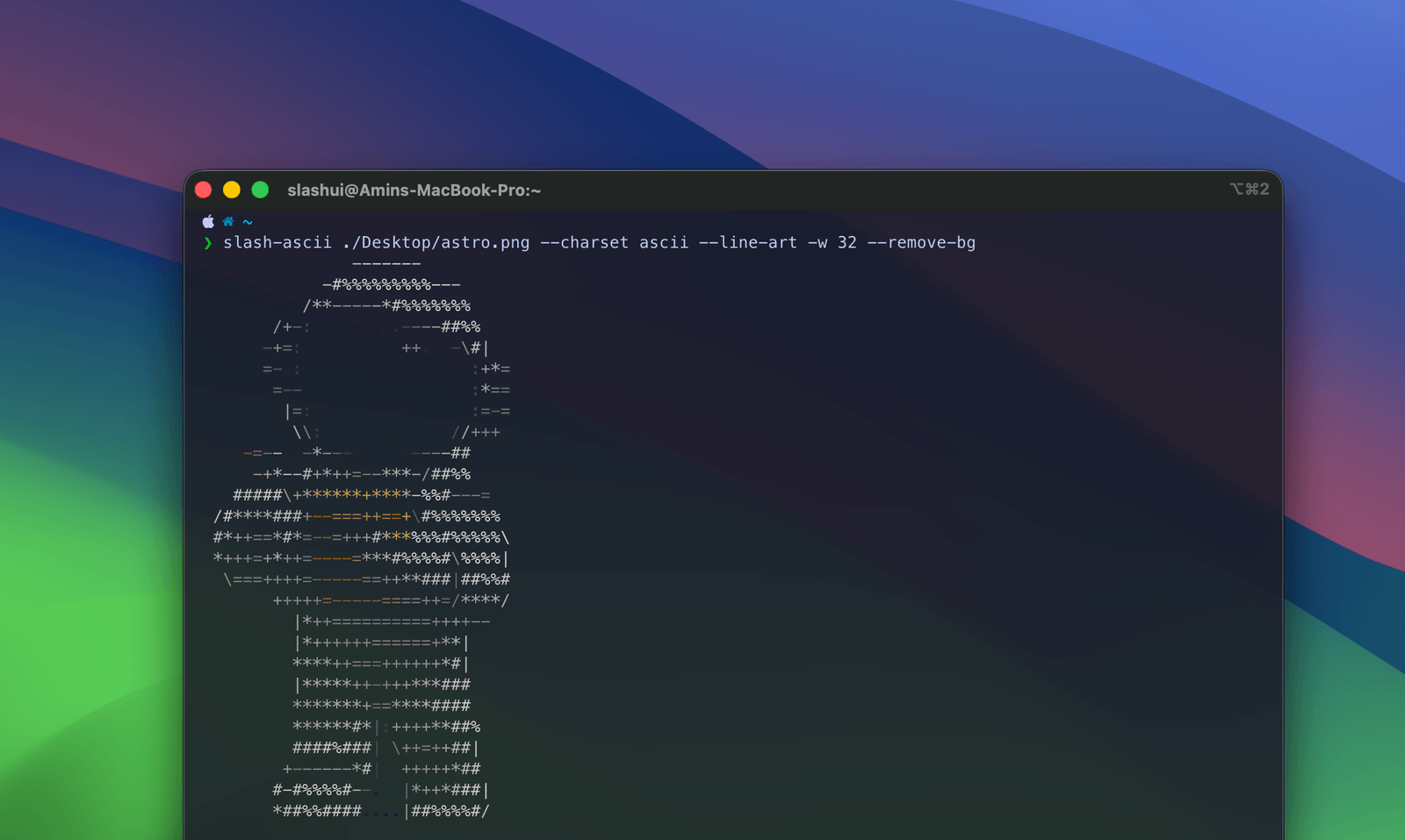
The --charset option decides which characters get used. Every
example below is real output from the tool, generated when this page was built
— not a picture of it. Try selecting the text.
ascii — the defaultOnly characters you would find on a keyboard, so it pastes safely into a code comment, a commit message or a chat window.
slash-ascii logo.png -w 100-*+++*- //-------#\ @=-------=@ \------=/ ------- @@@ === -@@@@@@ /@@@ --= -- /--\ @@@@@@@@@@@@ @@@ ---+ / @ @/--=\ @@@@ - /@@@ --= @ @ /+----=\ @@@ @@@ @@@@@@@@@ @@@@@@@@ ---#@@@@@@ @ /+-------\\ @@@@- /@@@ /@@@@@@@@@@@ @@@@@@@@@@ --=@@@@@@@@ @@ - - @@ @#++++++++-@ @@@@@@@ @@@@ @@@@ @@@@ @@@ ---+ @@@@ @@@@@@ /@@@ @@@/ @@@ @@@@@- --= @@@@ @@ - - @@ /#---------@ @@@@ @@@/ @@@/ @@@@ @@@@@@ =--+ @@@ /@ \=-------*/ @@@@ @@@ @@@@ @@@ @@@@ --= @@@@ | @ - \+----=/ @@- @@@@@ @@@- \@@@@ @@@@@ @- @@@@ ---+ @@@ \ @ @ @ \*--=% @@@@@@@@@@@@@ @@@@@ @@@@@@@@@@@@ @@@@@@@@@@@ --= |@@@ -@ @ @@ \\+/ @@@@- -@@ -@@- @ @ @ - -@ @@
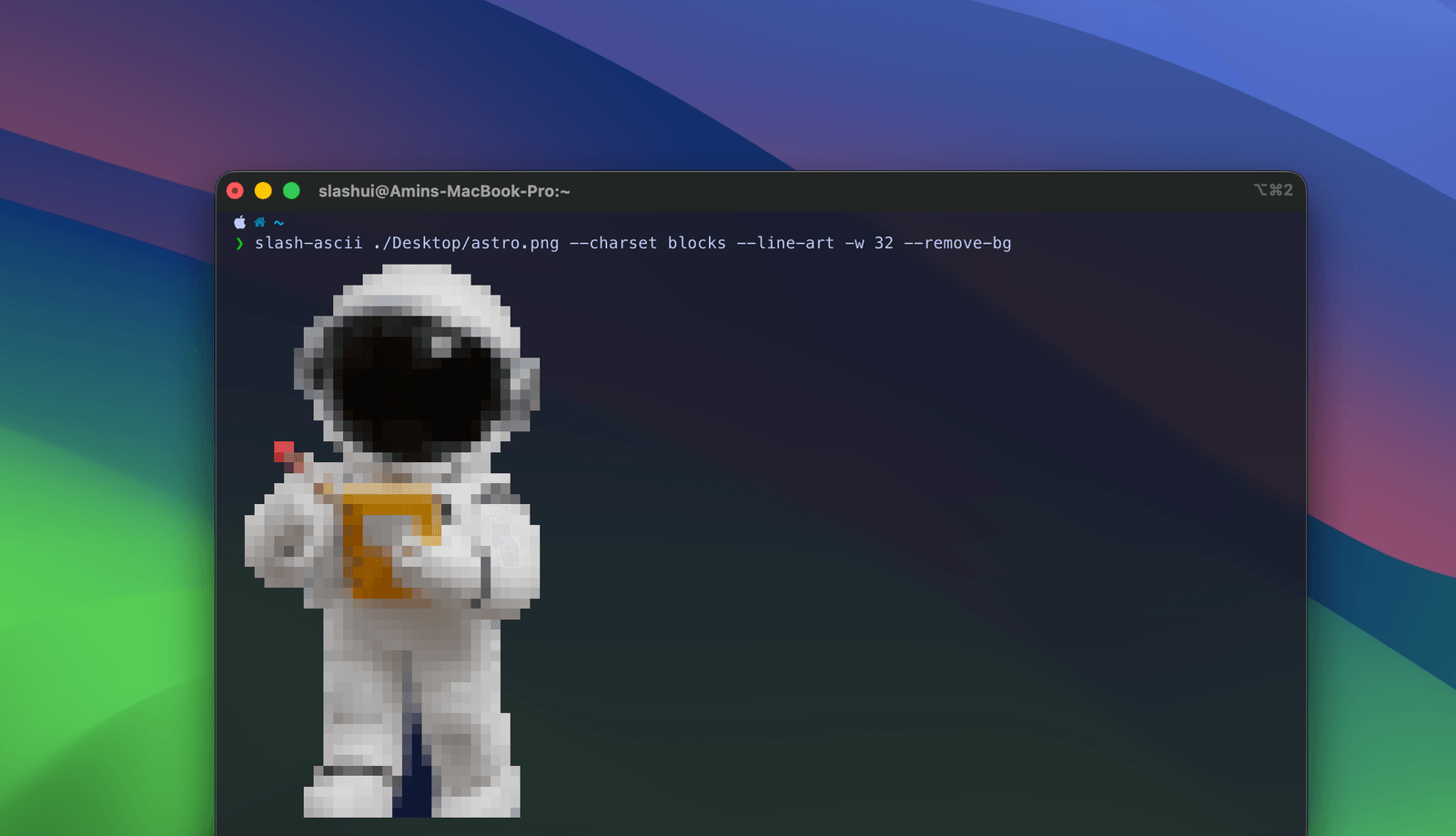
blocks — the best-looking oneUses the half-block character ▀ with a separate colour above and
below, so each character carries two pixels. Not really ASCII any more, which is
why you have to ask for it — but it looks dramatically better.
slash-ascii logo.png --charset blocks -w 100▄▄▀▀▀▀▀▄▄ ▄▀▀▀▀▀▀▀▀▀▄ ▀▀▀▀▀▀▀▀▀▀▀ ▀▀▀▀▀▀▀▀▀▀▀ ▀▀▀▀▀▀▀ ▄▄▄ ▄▄▄ ▄▄▄▄▄▄▄▄ ▄▀▀▀ ▄▀▀▀ ▀▀ ▄▀▀▀ ▄▀▀▀▀▀▀▀▀▀▀▀ ▀▀▀▀ ▀▀▀▀ ▄ ▀ ▄▀▀▀▀▀ ▀▀▀▀▀ ▀ ▄▀▀▀ ▄▀▀▀ ▄ ▄ ▀▀▀▀▀▀▀▀▄ ▀▀▀ ▀▀▀▀ ▄▄▀▀▀▀▀▀▀ ▄▄▀▀▀▀▀▀▀▄ ▀▀▀▀▀▀▀▀▀▄ ▀▀ ▀ ▀▀▀▀▀▀▀▀▀▀▄ ▀▀▀▀▄ ▄▀▀▀ ▄▀▀▀▀▀▀▀▀▀▀▀ ▀▀▀▀▀▀▀▀▀▀ ▄▀▀▀▀▀▀▀▀▀▀▀▄ ▀▀ ▄▄▄ ▄▄ ▄▀ ▀▀▀▀▀▀▀▀▀▀▀▀ ▀▀▀▀▀▀▄ ▀▀▀▀ ▀▀▀▀▀ ▀▀▀▀ ▀▀▀ ▀▀▀▀ ▀▀▀▀ ▀▀▀▀▀▀▀ ▄▀▀▀ ▀▀▀▀ ▄▀▀▀ ▀▀▀▀▄▄ ▄▀▀▀ ▀▀▀▀ ▄▀ ▀▀▀ ▀▀ ▀▀ ▄▀▀▀▀▀▀▀▀▀▀▀ ▀▀▀▀ ▀▀▀▀ ▀▀▀▀ ▀▀▀▀ ▀▀▀▀▀▀▀ ▀▀▀▀ ▄▀▀▀ ▄▄ ▄ ▄▄ ▀▀▀▀▀▀▀▀▀▀▀ ▀▀▀▀ ▀▀▀ ▀▀▀▀ ▀▀▀ ▀▀▀▀ ▀▀▀ ▀▀▀▀ ▀ ▀ ▀ ▀ ▀▀▀▀▀▀▀▀▀ ▄▄▄ ▄▄▀▀▀▀ ▀▀▀▄ ▀▀▀▀▄ ▄▀▀▀▀ ▄▄ ▄▀▀▀▀ ▀▀▀▀ ▀▀▀ ▀▄ ▀ ▀▀ ▀ ▀▀▀▀▀▀ ▀▀▀▀▀▀▀▀▀▀▀▀▀ ▀▀▀▀▀ ▀▀▀▀▀▀▀▀▀▀▀▀ ▀▀▀▀▀▀▀▀▀▀▀ ▀▀▀ ▀▀▀▀ ▄▄▄ ▀ ▀▄ ▀▀▀▀ ▀▀▀▀▀▀ ▀ ▀▀▀▀ ▀▀▀▀▀▀ ▄▄ ▄ ▀ ▀▀ ▀▀ ▀▀
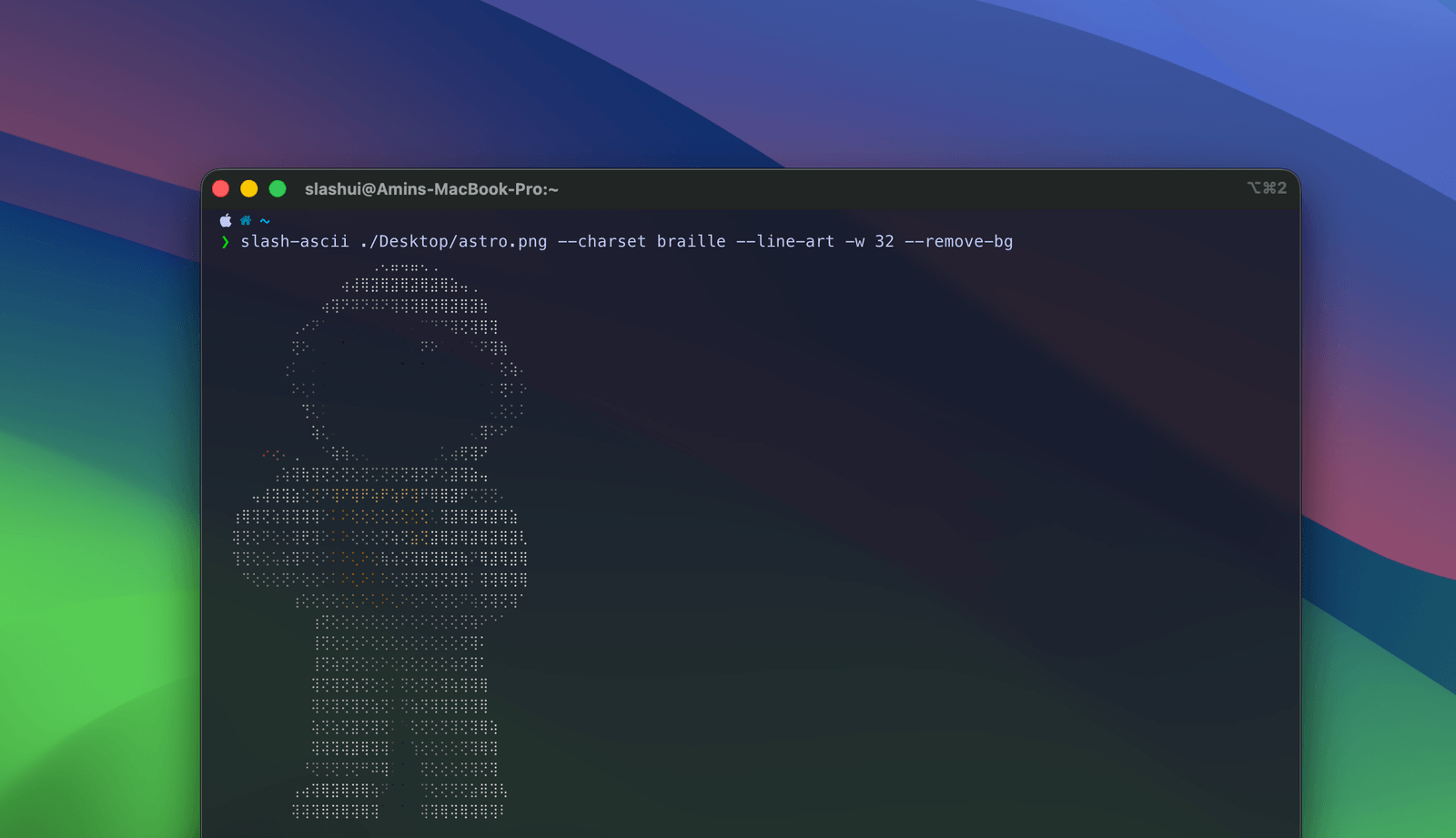
braille — the most detailedPacks 2×4 dots into every character, resolving far more detail than the other
two. Your terminal font needs braille glyphs; if you see empty boxes, use
blocks.
slash-ascii logo.png --charset braille -w 100⣴⠞⢝⠝⢝⠗⢦ ⢠⠟⢅⠕⢅⠕⢅⠕⢅⢽⡄ ⢸⠕⢅⠕⢅⠕⢅⠕⢅⢝⡇ ⣷⠅⠕⢅⠕⢅⠕⢅⣽ ⠳⠷⣥⣵⣥⠵⠛ ⣀⣤⣤ ⢀⠄ ⣀⣤⣤⣤⣤⣤⣄ ⢰⣿⣿⡟ ⠕⢅⢕ ⠟⠻ ⢠⢞⠝⢦ ⣠⣾⣿⣿⣿⣿⣿⣿⣿⣿⣿⡿ ⣾⣿⣿ ⢄⠕⢅⠅ ⣴ ⣦ ⣰⠟⢅⠕⢝⢷ ⣾⣿⣿⡟ ⠙ ⢰⣿⣿⡟ ⢅⠕⢕ ⣤ ⢠ ⣴⢏⠕⢅⠕⢅⠝⢷ ⣿⣿⣿ ⣾⣿⣿ ⣠⣴⣶⣶⣾⣿⣷⣶⣶ ⣤⣶⣾⣿⣿⣿⣶⣶ ⠔⢅⠕⣵⣶⣾⣿⣷⣶⣤ ⠃ ⣼⠕⢅⠕⢅⠕⢅⠕⢅⢽⡄ ⢿⣿⣿⣧⣀ ⢰⣿⣿⡟ ⣠⣾⣿⣿⡿⠟⠛⠛⢻⣿⣿⣿ ⣴⣿⣿⠿⠛⠛⠛⠛⠻⠟ ⠕⢅⢕⠟⠛⠛⠛⠿⣿⣿⣿ ⠸⣧ ⣤ ⣤ ⣤⠗ ⠸⣥⣕⣥⣕⣥⣕⣥⣕⣥⣵⡽ ⠻⣿⣿⣿⣿⣶⣤ ⣾⣿⣿⠇ ⣾⣿⣿⠟ ⣼⣿⣿⡇ ⣿⣿⣿ ⢄⠕⢅⠅ ⢹⣿⣿⡇ ⠛⠿⣿⣿⣿⣦ ⢰⣿⣿⡿ ⣾⣿⣿⠃ ⣿⣿⣿ ⢻⣿⣿⣷⣦⣄ ⢅⠕⢕ ⣼⣿⣿⡇ ⢰⡟ ⠛ ⠛ ⠻⡆ ⢰⢟⠟⢝⠟⢝⠟⢝⠟⢝⠟⣦ ⢿⣿⣿⡇ ⣾⣿⣿⠇ ⢸⣿⣿⡏ ⣼⣿⣿⡇ ⠛⠿⣿⣿⣿⣦ ⠔⢅⠕⠅ ⣿⣿⣿ ⣠⣄ ⢳⠕⢅⠕⢅⠕⢅⠕⢅⣽⠋ ⣸⣿⣿⡇ ⣿⣿⣿ ⢸⣿⣿⡇ ⣿⣿⣿ ⢹⣿⣿⡇ ⠕⢅⢕ ⣼⣿⣿⡇ ⠛ ⠚ ⠉ ⢻⣅⠕⢅⠕⢅⢕⡽ ⣶⣤⣀ ⣠⣴⣿⣿⡿ ⣿⣿⣿⣄ ⠸⣿⣿⣷⣄ ⣠⣾⣿⣿⣏ ⣤⣀ ⣼⣿⣿⠇ ⢄⠕⢅⠅ ⣿⣿⣿ ⠻ ⠟ ⠺ ⠻ ⠹⣕⢅⠕⢅⡽ ⠾⣿⣿⣿⣿⣿⣿⣿⣿⣿⣿⠿⠋ ⠙⢿⣿⣿⡿ ⠙⢿⣿⣿⣿⣿⣿⣿⠟⣿⣿⣿ ⢾⣿⣿⣿⣿⣿⣿⣿⣿⠿⠋ ⢅⠕⢕ ⣼⣿⣿⡇ ⣦⣤ ⡶ ⠰⡆ ⠙⣥⣵⡟ ⠉⠉⠉⠉⠉ ⠉⠉⠉ ⠉⠉⠉⠉ ⡄ ⣄ ⠳ ⠶ ⠶⠆ ⠾⠋
On a photograph rather than a logo, with the background removed:
A stroke narrower than a character cell is a coverage problem, not a resolution problem. A cell paints only once it is at least half covered, so a hairline crossing a cell covers perhaps a fifth of it, falls short, and the line arrives as speckle or not at all.
--line-art lowers that cutoff and turns off the median filter,
which is a majority vote among neighbours that any stroke thinner than its 3×3
window loses.
slash-ascii logo.svg --charset blocks --line-art -w 124▄▀▀▀▀▀▀▄▄ ▄▀▀▀▀▀▀▀▀▀▀▀ ▀▀▀▀▀▀▀▀▀▀▀▀▀ ▀▀▀▀▀▀▀▀▀▀▀▀▀ ▀▀▀▀▀▀▀▀▀▀▀▀ ▀▀▀▀▀▀▀▀▀▀ ▀▀▀ ▀▀▀▀▀ ▀▀▀▀▀ ▄▄▄ ▄▄▄ ▄▄▀▀▀▀▀▀▀▄▄▄ ▀▀▀▀ ▀▀▀▀ ▀ ▀▀ ▄▀▀▀▀▄ ▄▀▀▀▀▀▀▀▀▀▀▀▀▀▀▀ ▀▀▀▀▀ ▀▀▀▀▀ ▀▀ ▀▄ ▄▀▀▀▀▀▀▄ ▄▀▀▀▀▀ ▀▀ ▀▀▀▀ ▀▀▀▀ ▄ ▄ ▀▀▀▀▀▀▀▀▀▄ ▀▀▀▀ ▀▀▀▀▀ ▄▄▄▄▄▄▄▄▄▄ ▄▄▄▄▄▄▄▄▄ ▀▀▀▀▀▄▄▄▄▄▄▄ ▀▀ ▀ ▀▀▀▀▀▀▀▀▀▀▀▄ ▀▀▀▀▄ ▀▀▀▀ ▄▀▀▀▀▀▀▀▀▀▀▀▀ ▄▀▀▀▀▀▀▀▀▀▀▀▀ ▀▀▀▀▀▀▀▀▀▀▀▀▀▄ ▄ ▄ ▀▀▀▀▀▀▀▀▀▀▀▀▀▀ ▀▀▀▀▀▄▄ ▀▀▀▀▀ ▀▀▀▀▀▀▀▀ ▄▀▀▀▀ ▄▀▀▀▀▀ ▀▀ ▀▀▀▀▀▀ ▀▀▀▀▀▀ ▀▀ ▀▀ ▀▀ ▀▀ ▀▀▀▀▀▀▀▀▀▀▀▀▀▀ ▀▀▀▀▀▀▀▀▄▄ ▀▀▀▀ ▄▀▀▀▀▀ ▀▀▀▀ ▀▀▀▀ ▀▀▀▀ ▀▀▀▀ ▀▀▀▀▀▀▀▀▄ ▀▀▀▀▀ ▄▀▀▀▀ ▄▀▀▀▀ ▀▀▀▀▀▄▄ ▀▀▀▀▀ ▀▀▀▀ ▀▀ ▀▀ ▀▀▀ ▀▀▄ ▀▀▀▀▀▀▀▀▀▀▀▀▀▄ ▀▀▀▀▀ ▀▀▀▀ ▀▀▀▀ ▀▀▀▀ ▀▀▀▀▀▀▀▀▄ ▀▀▀▀ ▄▀▀▀▀ ▀ ▀ ▀▀▀▀▀▀▀▀▀▀▀▀▀▀ ▀▀▀▀▀ ▀▀▀▀▀ ▀▀▀▀ ▄▀▀▀▀ ▀▀▀▀▀▀ ▀▀▀▀▀ ▀▀▀▀▀ ▀▄ ▀▀ ▀▀▀▄ ▀▀▀▀▀▀▀▀▀▀▀▀ ▀▀▀▀ ▀▀▀▀ ▀▀▀▀ ▀▀▀▀ ▀▀▀▀ ▀▀▀▀ ▀▀▀▀ ▄ ▄ ▄ ▀▀▀▀▀▀▀▀▀▀ ▄▀▄▄▄ ▄▄▄▀▀▀▀▀ ▀▀▀▀▄▄ ▀▀▀▀▄ ▄▀▀▀▀▀ ▄▄▄ ▄▀▀▀▀ ▄▀▀▀▀ ▀▀▀▀▀ ▀▀ ▀▀ ▀▀ ▀▀ ▀▀▀▀▀▀▀▀ ▀▀▀▀▀▀▀▀▀▀▀▀▀▀▀▀ ▀▀▀▀▀▀ ▀▀▀▀▀▀▀▀▀▀▀▀▀▀▄ ▀▀▀▀▀▀▀▀▀▀▀▀▀ ▀▀▀▀ ▀▀▀▀ ▄▄▄▄ ▄▀ ▀ ▀▀▀▀▀ ▀▀▀▀▀▀▀▀▀▀▀ ▀▀▀ ▀▀▀▀▀▀▀▀ ▀▀▀▀ ▀▀▀▀▀▀▀▀▀▀ ▀▀▀▀ ▀▀▀▀▀ ▀▀ ▀ ▀ ▀▀ ▀▄ ▄▄ ▄▄ ▄▀ ▀ ▀▀ ▀▀ ▀
It only ever adds ink, never removes it. The cost is that a cutoff low enough to catch a stroke also catches the antialiased rim of a solid shape, so silhouettes grow by up to a cell.
There is a floor. A feature narrower than one cell can be
detected but not drawn at its true width. Roughly, you want
columns ≥ image width ÷ thinnest stroke width — so a 2px rule on
a 318px logo wants about 160 columns.
--remove-bg runs a saliency model over the image, keeps the
largest connected region, and crops to it.
slash-ascii portrait.jpg --remove-bgThis is the one feature that needs a model file, and it is not bundled. The first time you use it the tool tells you exactly what it wants to download, how big it is, where it comes from and where it will be saved — then asks. Pressing Enter declines, and declining is not an error.
| Tier | Model | Size | Good for |
|---|---|---|---|
lite (default) | u2netp | 4.6 MB | General subjects, fast |
full | u2net | 176 MB | Fine edges, hair, complex outlines |
| Flag | Default | What it does |
|---|---|---|
-w, --width <n> | terminal width | Output width in columns |
-h, --height <n> | from the image | Output height in rows |
--char-aspect <n> | 0.5 | Cell width ÷ cell height |
-c, --color <mode> | auto | true, 256, mono |
--charset <name> | ascii | ascii, blocks, braille |
--ramp <chars> | " .:-=+*#%@" | Ramp characters, darkest first |
--invert | off | Flip the ramp, for light backgrounds |
--no-edges | edges on | Brightness only, no line characters |
--no-denoise | on for bitmaps | Skip the median filter |
--line-art | off | Keep hairlines |
--alpha-cutoff <n> | 0.5 | Coverage a cell needs to paint |
--remove-bg | off | Keep only the subject |
--model <tier> | lite | lite or full |
--threshold <n> | 0.5 | Mask cutoff, 0 to 1 |
--format <fmt> | ansi | ansi, txt, html, svg |
-o, --output <file> | stdout | Write to a file |
--offline | off | Fail rather than fetch anything |
-y, --yes | off | Approve a model download without asking |
--model-dir <path> | cache directory | Where models are stored |
slash-ascii photo.jpg --format txt -o art.txtslash-ascii photo.jpg --format html -o art.html
slash-ascii photo.jpg --format svg -o art.svgcurl -s https://example.com/photo.jpg | slash-ascii - --format svg -o art.svgslash-ascii photo.jpg --invertimport { convert } from 'slash-ascii';
import { readFile } from 'node:fs/promises';
const art = await convert(await readFile('photo.jpg'), {
width: 80,
format: 'txt',
});postinstall script.Downloads are checked against a pinned size and SHA-256 before the file is moved into place, and the checksum is re-verified every time it is loaded. In CI or under cron, where there is nobody to ask, the tool does not hang and does not download — it explains what it needs and exits.